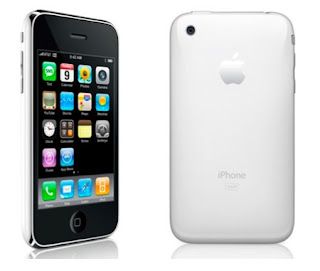
After reading about the Air Jacket (white) for iPhone 3G from Power Support on a Japanese blog, I decided to get one for myself too.
Saturday, January 24, 2009
Review and Photos: Air Jacket White for iPhone 3G
Tuesday, November 25, 2008
Gadget Ad: new line up of au mobile phones
This ad features some of the new phones for au in Japan: Sharp's W64SH, Toshiba's W65T, Casio's W63CA, Sony Ericsson's re, and Hitachi's W63H.
Wednesday, November 19, 2008
NEC’s N-03A Vanilla White– The cell phone for vanilla lovers

NEC has gotten together with Pierre Hermé, who is often referred to as the Picasso of pastry, to produce their new model N-03A, which is to be released in on the 20th of this month in Japan.
Lots of different colors!
The photo above is the Vanilla White version of the phone. It is also available in Macaron Pink, Apricot Orange, Chocolate Brown, and Cassis Blue.
What’s special?
In addition to the regular slate of cell phone features in Japan such as 1seg TV and e-wallet, the N-03A comes with pastry themes and wallpapers to satisfy sweets lovers. See below for a sample of the themes.
The N-03A will be available on November 20th in Japan. Please visit its website for more photos. Thanks for reading!
Source:
NEC Mobile
Thursday, November 6, 2008
iPhone 3G Unbox Pics


Sunday, November 2, 2008
OMG!!! My iPhone data transfer fees are 192,123 yen ($1,900)!!!

Ok. That’s how much I’d have to pay if I didn’t have an unlimited data plan. I sure got worried and surprised when I first saw it.
Apparently, this is the number before the unlimited data plan is applied. I guess that’s SoftBank’s way of saying – look! That’s how much you saved!
Thursday, October 30, 2008
SoftBank iPhone Announcement: Free Wifi, watch TV with iPhone, and emoticons in Japan by the end of 2008
In the announcement of SoftBank regarding the new line up of cell phones for winter, they also made some exciting ones for Japanese iPhone users. Here are the announcmenets.
- Free wifi for iPhone users at about 3,500 locations (McDonald’s, train stations, airport, and etc.)
- An external unit that serves as a mobile digital TV receiver and battery. This is seen in the following image. As you can see, the design is surely inspired by the iPhone itself, but it’s not availble in white!

What’s neat is that if you just want to watch TV, you do not need to hook the device to the iPhone. The unit pairs up with the iPhone, and transfers the TV contents via wifi to a TV app, which will be provided by SoftBank for free.
This will be available in December for about 10,000 yen (about $100). I personally need the battery over the TV function, but it’s nice to have the TV function just in case.
This is definitely a creative way to enable watching TV on iPhone. I think we're going to see other TV tuner products like this soon in other countries using a similar concept. - As rumors have already circulated, within this year, the iPhone will support emoji (the Japanese word for emoticons).
Source:
IT Media (Japanese) - You can also see actual photos of the TV / Battery pack itself.
iPhone vs. Japanese cell phones: 15 Features that iPhone doesn’t have for the Japanese market

- S! Addressbook Back-up – Basically it’s a service to back up and sync your contacts to a server. A nice feature included in the service is birthday notification via SMS. To learn more about this service, see here – it’s in English =)
- S! Friend’s Status – It’s a service that lets you set your status and mood. You can also check up on your friends’ status. See here for more info.
- S! Info Channel – News and weather info are delivered to your cell. What’s cool is that supporting cellphones well display the current weather conditions on your default home screen.
- Remote lock – In the case you lose your cellphone, you can remotely lock your cell phone.
- Yahoo! Kids – Basically this service blocks the kids from accessing inappropriate sites.
- Web Access Restrictions – This blocks users from visiting sites such as matching sites for teenagers.
- Ichi Navi – It’s basically a service for parents to know where their children are via GPS. See here for more info.
- Voice Mail Plus – An upgraded voice mail service with more message capacity for other SoftBank cell phones.
- S! Felica – Basically an e-wallet and electronic train pass. See here for more info.
- E-Comics – Basically new phones can download a special comic viewer that lets them buy digital copies of comics.
- Video services
- Infrared functions
- 1 seg – function for digital audio / video services
- bar code reader
- cell phone ring tones – Since iPhone users can only buy ring tones from iTunes, they won’t be able to buy anything from the mass selection of ring tones provided by the carrier. Bummer.
Tuesday, October 28, 2008
Transform your iPhone 3G into a mini iMac with iClooly
I posted about iClooly for the iPod Touch back in June. Apparently, it’s now also available for the iPhone 3G as well.
What’s cool with the iClooly is that it swivels so you can have your iPhone / touch in either lanscape or portrait view. The only problem is it wouldn’t work if your iPhone / touch has a case.
The iClooly for iPhone is available on iClooly.com for $47.00.
Monday, October 27, 2008
Buying an iPhone in Japan
I have a confession to make. I finally took the plunge and bought an iPhone 3G.
Stay tuned for unbox photos and an in-depth post on iPod touch vs. iPhone where I’ll detail the changes I experienced upgrading from the touch to the iPhone.
For this post, I’ll talk about my experience getting an iPhone in Japan.
Preparing to go
As a foreigner, sometimes getting a phone can be a nightmare. So I made sure I had my passport, credit cards, and alien registration card with me before I head to my local SoftBank store.
At the store
The process went rather smooth. I had been using a Nokia 6680 phone with SoftBank for about two years. It seems like changing phones is a breeze for foreigners. All I had was to show my alien registration card.

Anyway, the setup was a breeze. After that, I set up my email accounts and MobileMe accounts. There were some hiccups with MobileMe. For some reason, my Address Book on Mac suddenly had duplicate entries of everything while the iPhone didn’t. I restored my Address Book using Time Machine, and re-synced everything again. Everything seems to be working fine for now.
That’s all for now. Thanks for reading!
Thursday, October 23, 2008
The Sanctuary: Beautiful and modern charging station for your iPod touch / iPhone / and everything else (almost)
Came across this from an email newsletter from AssistOn (a Japanese store that sells designer items).
The Sanctuary is a stylish charging station from Bluelounge. According to their website, users can “charge their cell phone, PDA, Blackberry, iPod, MP3 player, and Bluetooth headset simultaneously in one location.”
It is available on Bluelounge website for $129.95. It comes in white and black. The inner tray is reversible with two colors black and tan. The tan color would work well with wooden surfaces and Muji-style interior. More info and details are on their website.
This one is on my wishlist…
Thanks for reading!
Tuesday, October 21, 2008
Looking for an iPhone case – SwitchEasy Colors maybe?
I am on the edge of getting an iPhone, but I haven’t plunged yet. I thought, what case would I get if I did buy an iPhone.
So I looked at the reviews as iLounge. The highest rating was SwitchEasy Colors, which got an A. SwitchEasy Colors is a silicone case, and has several color variations including white. But after reading some reviews, the white color one doesn’t seem to stay white for too long. If I were to go with SwitchEasy Colors, I’d probably go with orange simply because it’s the theme color of the current company I’m working in.
But it would hide the shiny white of the white iPhone 3G! I guess I need to find a clear hard case…
Tuesday, October 14, 2008
Gadget Ad: WILLCOM 9 - Another white cellphone in Japan
Saturday, October 11, 2008
Softbank’s iPhone 3G TV Commercial in Japan
Softbank recently started to air a new commercial that is revolved around the iPhone. This series of commercials from Softbank is quite strange. The dad of this family is a white dog, and basically he got a new phone, which is the iPhone. He’s trying to hide it from the family, but the family finds out. Then family plays around with the iPhone by flicking through a Japanese comic strip app (I think). See for yourself below.
Wednesday, October 8, 2008
A closer look at Japan’s SoftBank iPhone 3G price plan
SoftBank allows you to pay the cost of the iPhone itself in 12 or 24 monthly installments. The monthly plan excluding the costs of iPhone consists of:
- A calling plan - with White Plan being the least expensive at 980 yen (around 9 dollars)
- A S! Basic Pack - 315 yen (around 3 dollars)
- A data plan called Packet Flat Rate Full – Unlimited Mail/Web use starting from a fixed monthly charge of 1,029 yen (around $10) to a maximum of 5,895 yen (around $59)
About Packet Flat Rate Full
If you stay under 1,568,000, which is around 1.6 megabyte, you will pay 1,029 yen for the data plan. Once you exceed 1.6 megabytes, you will be charged 0.084 yen for every 128 bytes until you reach around 9 megabytes. One you reach 9 megabytes, you will be charged 5,958 for data, and your data plan automatically becomes unlimited.
The minimum monthly fees: 2,324 yen (around $23)
The minimum fees you have to pay to use an iPhone is 2,324 yen (980 + 315 + 1,029).
That may sound cheap, but…
Realistically speaking, to fully reap the benefits of the iPhone and staying under the minimum data usage allotment of 1.6 megabytes, it’s pretty hard.
According to Mac Fan October issue, here are some stats for reference
- Receiving 13 mails with photo attachments will put you at 9 megabytes of data usage
- Accessing Apple’s website 18 times with put you at 9 megabytes of data usage
My Mindset
It’s probably better to just expect to pay 5,985 for the data plan. And if I stay under the data usage of 9 megabytes, then I'll consider myself lucky that month.
Source:
Mac Fan October 2008 Issue
SoftBank
Sunday, October 5, 2008
iPod touch 2G can be a phone with fring
You can now get a free VoIP app called fring for the iPod touch from the App Store. This is pretty big news for iPod touch 2G owners as well as those still contemplating on buying touch 2G or iPhone 3G.
According to the comments section in iLounge’s article, iPod touch 2G does work with fring. It’ll require a compatible microphone such as Apple’s In-Ear Headphones with Remote and Mic.
Wifi everywhere + iPod touch 2G = a phone!
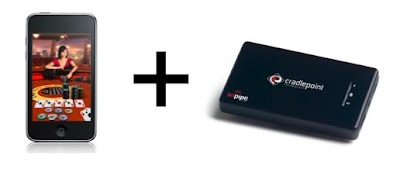
If you can get a wi-fi connection everywhere like using CradlePoint’s PHS300, then your iPod touch 2G can be truly used as a phone.
PHS300 + iPod touch 2G = the closet thing to an iPhone with an iPod touch 2G
All you’re missing is the SMS, contacts integration, and a camera (well, and a real GPS, but with wi-fi, you can still find your location with Google Maps).
Ok, so in order to make the touch 2G into an iPhone, what do you need with you at all times?
- iPod touch 2G (with fring installed)
- PHS 300 + modem (of course, with a data plan)
- A camera
iPod touch 2G vs. iPhone 3G: my decision
As for me, I’m still leaning towards buying an iPhone 3G. One reason is that I like to take lots of pictures, and I don’t want to bring a separate camera. Right now, I’m holding out just a little bit to see if a 32GB iPhone comes out.
Thursday, September 25, 2008
The Shiny White Office Version 1.0
One of things I really want to do is to build a shiny white home office. In this blog post, I present you with version 1 of the shiny white office. The following would be the shiny white gadgets to build one:
- Computer: White MacBook

- Input Device: Wireless Mighty Mouse and Wireless Pro Keyboard (old version because it’s whiter)


- Scanner: Fujitsu ScanSnap S300M

- Phone / PDA: iPhone 3G – 16GB white model

- Speakers: Yamaha NX-B02WH – White Bluetooth stereo speaker from Yamaha

- USB Hub: Podrea’s PH-D4-FW or PH-D3-FW– White USB hub – 4 port


- Pen Tablet: Bambo Fun – White model

What’s missing?
- Backup solution:
I came across the HDC2-U1.0 (product info page in Japanese) in an electronics store last week. It’s compact and encloses two hard drives. It’s available in 1TB and 2TB models, and best of all it’s silver and white design would be perfect for a shiny white office.
The problem is it has no fan although on its website it claims excellent heat conductivity. From what I’ve read, it gets pretty hot. And overheating is a concern since these drives would probably be used when the computer is on.
This means the search for a white external hard disk is still on. - Monitor:
After using dual monitors, I can never go back. Problem is I haven’t come across a nice looking white monitor yet. - Printer:
Last time I visited the electronics store, I think I saw some nice white printers. Have to look into it some more.
That’s all for now!
If you have any suggestions to add to the shiny white office, please let me know!
Tuesday, September 16, 2008
Trying to make iPod touch 2G into an iPhone using CradlePoint’s PHS300
In a previous post (iPod touch 2G vs. iPhone 3G), I mentioned the key differences between the iPod touch 2G vs. iPhone 3G.
- Phone / SMS + Contacts integration
- GPS
- Internet connectivity everywhere
- A camera + an easy way to manage photos
- Less items to carry
PHS300 lets you become a walking WiFi hotspot
The PHS300 (with the PHS standing for personal hotspot) is a portable WiFi router (powerd by a battery) that can be connected to broadband-enabled cellular phones and modems. According to bloggers that used the device, one charge for the PHS300 can last about 1.5 hours with an USB modem. It costs $179.99 and you can purchase it on CradlePoint's homepage.
The iPod touch + PHS300 combo
So the idea here is – we can use the PHS300 as a mobile wifi hotspot and hook the iPod touch to it.
With the PHS300, we can eliminate another difference between the Touch and iPhone – Internet connectivity everywhere. That’s right, using the PHS300 with an iPod touch you can surf the web with Safari, watch YouTube videos, buy music from the iTunes store, and use apps that require a net connection at any location with coverage. That also means that Maps app can find the approximate location of where you are, which makes the iPod touch become a pseudo-GPS device.
Pricing
Let’s take a look at what we have to pay for:
- iPod touch 16GB + PHS300:
iPod touch 16GB ($299) + PHS300 (179.99) + Mobile Broadband Internet connection fees + modem - iPhone 3G
iPhone 3G 16GB (around $750 w/o contract) + Voice and Data Plan
The difference:
In terms of hardware, iPod touch and PHS300 together cost $480 while the iPhone alone is $750. The difference is about $270. You also have to factor in the modem or handset that will be providing the Internet connection. So at the end of the day, the price difference in terms of hardware is not a whole lot, and the iPhone 3G might actually be the better deal. It is especially the case if you get an iPhone with a contract, which makes the iPhone itself a lot cheaper.
Advantages of the iPod touch + PHS300 combo
The iPod touch + PHS300 combo does have one plus that the iPhone 3G does not have – ability to share an Internet connection. That means other devices and computers can also share the connection.
Disadvantages of the iPod touch + PHS300 combo
Compared to the iPhone, you don’t get the camera, the phone, and a real GPS. More importantly, you have to bring a lot of gadgets to achieve what the iPhone can do. Here’s exactly what you need to bring:
- A cell phone
- A camera if your cell phone doesn’t have one
- An iPod touch
- PHS300
- A modem if your cell phone is mobile broadband enabled
iPhone also provides an extra layer of convenience. With the iPod touch + PHS300 combo, when you need to get online, you have to turn on the switch. If you’re using a cellular phone with the PHS300, you have to connect it. When you’re done, you have to turn it off assuming you want to preserve battery life.
And of course, the iPhone also lets you streamline you data management like photos and contacts because they are all integrated.
Who should consider the iPod touch + PHS300 combo?
If you already have a mobile broadband cell phone or modem with an unlimited data plan and you’re locked into a contract, by purchasing the PHS300 and an iPod touch, it could be next closest thing to an iPhone without having to change or sign up for new services.
I, myself, have a mobile broadband device, an unlimited data plan, and a first gen iPod touch. PHS300 itself is an attractive device, but I don’t think it can replace the iPhone experience. The convenience of streamlined data management and carrying less devices is winning me over. Even if I do get the iPhone, I will probably still end up buying the PHS300 because it compliments my mobile broadband connection very well. Who wouldn’t want to be a walking hotspot?
Lastly, more info on PHS300
I’ve read a few blog posts regarding the PHS300, and they were in general very positive. So positive it’s making me want to get one.
Thursday, September 11, 2008
iPod touch 2G vs. iPhone 3G: Which one to buy?
UPDATE: A new post comparing the iPod touch 2g and iPhone 3GS is here.
- Phone / SMS + Contacts integration
iPod touch owners aren’t just missing out on making phone calls and texting, we’re missing out on contacts integration with our phones. iPhone provides a seamless way of syncing and managing contacts between the phone and the computer. - GPS
This is a very valuable feature in a city like Tokyo where there aren’t a lot of street signs. - Internet connectivity everywhere
iPod touch owners cannot use their FaceBook app or watch YouTube videos in places without an Internet connection. - A camera + an easy way to manage photos
I use my Nokia phone to take a lot of pictures. I have to sync them with iPhoto, and then sync them to my iPod touch. With an iPhone, it’ll save the need to sync twice and you can see the pictures you took without needing to sync. - Less items to carry
iPod touch owners have to carry their iPod and a cellphone. iPhone owners only carry one device.
For simplicity sake, in Japan today you can buy a 16GB iPhone 3G with a 2-year contract for around $320. With an unlimited data plan, you’ll be looking at monthly fees of around $68, which for two years would be $1,632. (I’m in Japan currently so I’m using Japanese pricing as a reference point. I think pricing in other countries should be similar.)
An iPod touch 16GB costs $300 ($299 to be exact), which means that for an extra $20 and two year service fee of about $1,630, you’ll get the above benefits.
It’s a really hard comparison because we are trying to take into consideration of the monthly charges. If we take the monthly charges out of the picture, and buy a 16GB iPhone 3G without a binding contract, it would cost around $750 (80,640 yen). Strictly looking at hardware, the difference is $450.
The bottom line: iPod touch 2G or iPhone 3G?
This is a really tough question. For now, here are the lists of criteria that would help you decide whether you should buy an iPhone vs. the iPod Touch. If you answer yes to most of them, perhaps the iPhone is the better choice.
- Do you manage your contacts with your computer and cellphone?
- Do you see yourself using GPS and Google Maps a lot?
- Do you take a lot of casual photos with your cell phone?
- Do you plan to use a lot of apps that require a net connection?
- Do you “really” mind carrying two devices instead of one?
- Do you have MobileMe?
- Are you a Mac user? And do you use iCal, Address Book, and iPhoto extensively on your Mac?
Wednesday, September 10, 2008
iPod touch 1G vs. iPod touch 2G: To upgrade or not?
Yesterday Apple announced a new version of the iPod touch. When compared to the 1st generation iPod touches, putting the battery life and pricing aside, what’s new?
- New design
A modified design, but no white version - Built-in speakers
This is a big one for me. There are several occasions at my friend’s house where I found a YouTube video on my Touch, and I can only show it, but with no audio. Those were the times I wished I had an iPhone. - Volume controls
Volume buttons are on the left side so you can adjust the volume with the iPod touch physically. This goes hand-in-hand with the built-in speakers - Support for new earphones, which have a remote for volume and play controls and a mic
A much needed feature for music playback. With the previous version, every time you wanted to change the volume or song, you had to take the iPod touch out of your pocket. Mic support is neat. Now you won’t miss out on apps that take advantage of a mic like apps that record voice memos and Midomi (singing app). Now if there was a voice chatting app like Skype or iChat, the mic would become extremely useful. If such app does come out in the App Store, it'd be for both iPhone and iPod touch. Cell phone companies probably wouldn’t be too happy with iPhone users talking via wi-fi, so chances are slim for a voice chatting app, I think.
The new earphones are not included, and will set you back $29.99 or $79.99 depending on which model (regular or in-ear) you buy. - Built-in Nike+
I’m not a big fan of this one. A PDA-sized music player is kind of big to carry for jogging, don't you think?
If you can bare with taking out the iPod touch from you pockets every time you want to change a song or adjust volume, then you might want to sit out on this one. As for the speakers, there’s a workaround of attaching external speakers like:
If a voice chatting / VoIP app does ever come out, then it might worth considering since you can use the iPod touch as a voice communication tool.
You should consider upgrading if:
- you record a lot of voice memos
- you like to run and don’t mind the size of the iPod touch
- there are apps that use the mic that you absolutely use frequently
Now, if you don’t have an iPod touch, should you buy the new version?
Compared to when the 1G came out, the iPod touch has come a long way. It now has all the iPhone apps like Google Maps, and some of the usability flaws are fixed with external volume control, built-in speakers, and the new earphones.
Although it’s positioned as an entertainment device, it’s a very capable PDA. So the answer would be an easy yes - that is a yes, in a world without iPhones.
Thursday, September 4, 2008
5 reasons why Japanese consumers aren't buying iPhones
Just got back to Japan this week. So let’s start with some iPhone news in Japan.
Fuji Sankei Business reported yesterday that Apple’s iPhone sales is losing momentum in Japan. It was predicted that the iPhone would sell 1 million units in Japan, but a Japanese analyst from UBS is predicting that sales will stop at around 200 thousand units.
The article also states reasons why the iPhone is not taking off in Japan. Here they are:
- No emoticons!
iPhone does not support emoticons, which is part of mobile texting culture in Japan. - Can’t pay for stuff!
iPhone does not have e-wallet functions, which are common among other recent Japanese handsets. - Can’t watch TV!
iPhone also does not have 1seg, which is a service that lets Japnese consumers watch mobile terrestrial digital TV. - Email address has to be changed.
Softbank requires iPhone users to change their mobile email addresses. - Short battery life.
I’d personally add one more reason – the weak content lineup of iTunes in Japan. While it has a solid lineup of music contents, the lack of video contents is quite critical.
Source: FujiSnakei Business (Japanese)